
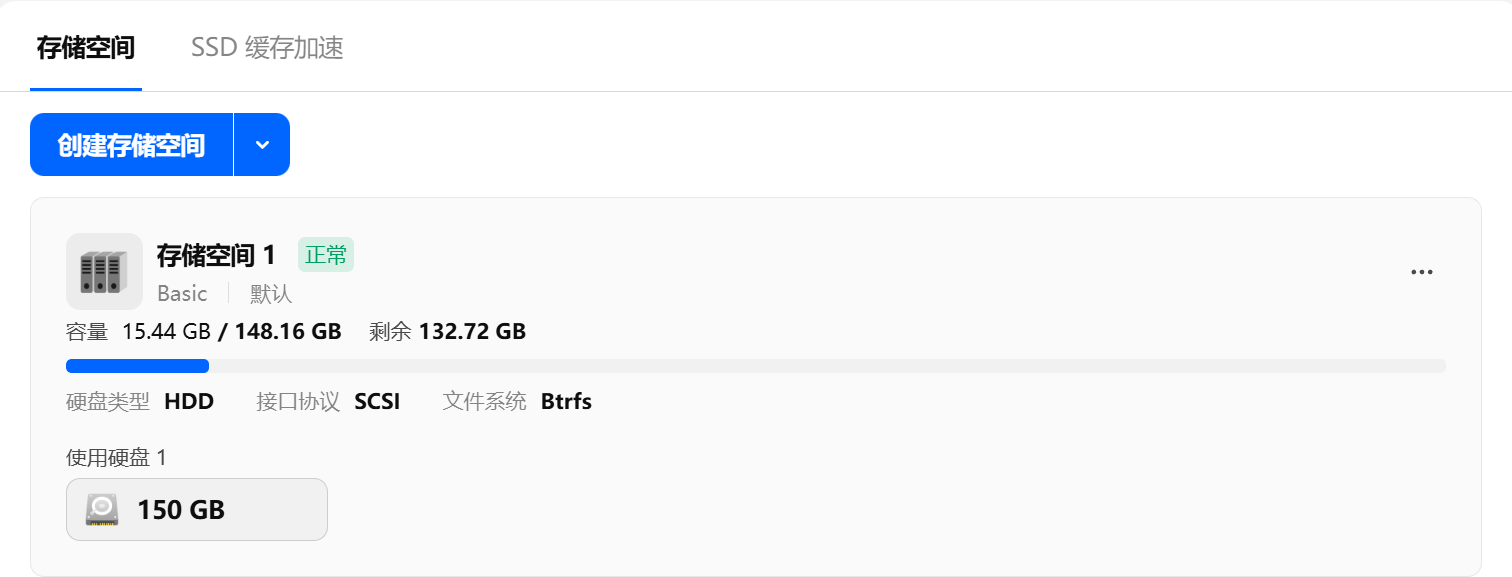
扩容qcow2文件
102是虚拟ID
# 切换到qcow2文件目录
cd /var/lib/vz/images/102/
# 查看qcow2文件信息
qemu-img info vm-102-disk-2.qcow2
# 扩容,比如增加30G
qemu-img info vm-102-disk-2.qcow2
如果扩容后虚拟机没有直接识别,重启虚拟机
扩容飞牛虚拟机硬盘
进入飞牛虚拟机,可以看到硬盘已经是150G,但是sdb1分区还是120G
root@outer-nas:/home/admin# lsblk
NAME                                              MAJ:MIN RM   SIZE RO TYPE  MOUNTPOINTS
sda                                                 8:0    0    32G  0 disk
├─sda1                                              8:1    0    94M  0 part
└─sda2                                              8:2    0  31.9G  0 part  /
sdb                                                 8:16   0   150G  0 disk
└─sdb1                                              8:17   0   120G  0 part
  └─md0                                             9:0    0 119.9G  0 raid1
    └─trim_d421b17d_9d11_4d5d_9b73_2670632c2f3c-0 253:0    0 119.9G  0 lvm   /vol1
重新给sdb进行分区,这里不会删除sdb里面原来的数据,依次执行:
d : 即delete表示删除分区
n : 即new表示新建分区
回车 : 分区号,默认为1,所以可以直接回车,也可输入1
回车 : 第一个扇区,默认从2048开始即可
回车 : 最后一个扇区,默认到最后一个扇区,也就是用完整块硬盘
y : 确认
w : 写入
root@outer-nas:/home/admin# fdisk /dev/sdb

Welcome to fdisk (util-linux 2.38.1).
Changes will remain in memory only, until you decide to write them.
Be careful before using the write command.

GPT PMBR size mismatch (251658239 != 314572799) will be corrected by write.
The backup GPT table is not on the end of the device. This problem will be corrected by write.
This disk is currently in use - repartitioning is probably a bad idea.
It's recommended to umount all file systems, and swapoff all swap
partitions on this disk.

Command (m for help): d

Selected partition 1
Partition 1 has been deleted.

Command (m for help): n
Partition number (1-128, default 1):
First sector (34-314572766, default 2048):
Last sector, +/-sectors or +/-size{K,M,G,T,P} (2048-314572766, default 314570751):

Created a new partition 1 of type 'Linux filesystem' and of size 150 GiB.
Partition #1 contains a linux_raid_member signature.

Do you want to remove the signature? [Y]es/[N]o: y

The signature will be removed by a write command.

Command (m for help): w
The partition table has been altered.
Syncing disks.
查看分区大小,已经扩容到了150G
root@outer-nas:/home/admin# lsblk
NAME                                              MAJ:MIN RM   SIZE RO TYPE  MOUNTPOINTS
sda                                                 8:0    0    32G  0 disk
├─sda1                                              8:1    0    94M  0 part
└─sda2                                              8:2    0  31.9G  0 part  /
sdb                                                 8:16   0   150G  0 disk
└─sdb1                                              8:17   0   150G  0 part
  └─md0                                             9:0    0 119.9G  0 raid1
    └─trim_d421b17d_9d11_4d5d_9b73_2670632c2f3c-0 253:0    0 119.9G  0 lvm   /vol1
扩展raid和物理卷,我可以使用vgs看到trim_d421b17d_9d11_4d5d_9b73_2670632c2f3c这个物理卷还是120G
root@outer-nas:/home/admin# vgs
  VG                                        #PV #LV #SN Attr   VSize   VFree
  trim_2a84216b_6785_4edf_a913_ad44e8a470bc   1   1   0 wz--n-  <1.82t    0
  trim_d421b17d_9d11_4d5d_9b73_2670632c2f3c   1   1   0 wz--n- 119.93g    0
# 扩展raid
root@outer-nas:/home/admin# mdadm --grow /dev/md0 --size=max
# 更新物理卷
root@outer-nas:/home/admin# pvresize /dev/md0
  Physical volume "/dev/md0" changed
  1 physical volume(s) resized or updated / 0 physical volume(s) not resized
再次查看
root@outer-nas:/home/admin# vgs
  VG                                        #PV #LV #SN Attr   VSize   VFree
  trim_2a84216b_6785_4edf_a913_ad44e8a470bc   1   1   0 wz--n-  <1.82t     0
  trim_d421b17d_9d11_4d5d_9b73_2670632c2f3c   1   1   0 wz--n- 149.93g 30.00g
扩展lvm
root@outer-nas:/home/admin# lvextend -L +30G /dev/mapper/trim_d421b17d_9d11_4d5d_9b73_2670632c2f3c-0扩展文件系统,我使用的是btrfs,所以使用以下命令
root@outer-nas:/home/admin# btrfs filesystem resize max /vol1
Resize device id 1 (/dev/mapper/trim_d421b17d_9d11_4d5d_9b73_2670632c2f3c-0) from 119.93GiB to max